SaaS Security Checklist: What Should You Test Before Launching Your Product?

Written By
Sarwat Iftikhar
Launching a SaaS product without validating its security controls puts customer data, tenant boundaries, and business reputation at risk. A single authorization flaw can expose one customer’s data to another, trigger account takeovers, or stall an enterprise deal that depends on a clean security review.
Before launch, teams need to test their application, APIs, cloud infrastructure, access controls, tenant isolation, source code, dependencies, data protection, logging, and recovery procedures. Automated scanners are useful for catching known vulnerabilities and misconfigurations, but they routinely miss authorization flaws, business logic abuse, and tenant isolation weaknesses. That gap is why manual testing has to be part of any serious pre-launch review, not an optional add-on.
Key Takeaways
- SaaS applications centralize data from many tenants behind a single set of controls, meaning a single authorization flaw can expose dozens of customers simultaneously rather than just one.
- Authorization failures, cross-tenant data access, and business logic flaws are consistently missed by automated scanners and require manual testing to surface.
- Fixing an authorization bug during development costs hours of engineering time. Fixing the same bug after launch involves incident response, forensic review, customer disclosure, and stalled enterprise deals.
- A complete pre-launch security review covers 12 domains: architecture, authentication, authorization, business logic, APIs, web vulnerabilities, cloud, source code, data protection, integrations, logging, and independent assessment.
- Enterprise buyers increasingly require recent penetration test documentation before signing, making pre-launch security testing a revenue enabler rather than just a risk control.
Why Does SaaS Security Testing Have to Happen Before Launch?
SaaS applications are attractive targets because they centralize data from many organizations behind a single set of controls. A flaw that affects one company in an on-premise deployment can expose dozens of tenants in a shared environment. Fixing an authorization bug during development costs a few hours of engineering time. Fixing it after launch involves incident response, forensic review, customer disclosure, and a delayed enterprise sales cycle.
Multi-tenant architecture adds specific risk because isolation between customers depends on application logic working correctly every time, not on network boundaries. Every new API endpoint, every shared database query, every background job that processes tenant data is a point where that isolation could silently fail.
Enterprise buyers increasingly ask for security documentation or a recent penetration test before signing. Unresolved findings discovered late in the sales process directly block revenue, which means a pre-launch security review is not just a risk control. It is a business readiness checkpoint.
How Do You Map Your SaaS Attack Surface Before Testing?
Before testing anything, document every component that needs protecting: web applications, admin portals, public and internal APIs, user roles, cloud resources, databases, file storage, third-party integrations, webhooks, CI/CD pipelines, staging environments, and support access paths into customer data. This surface definition determines the scope of every subsequent test.
Lightweight threat modeling helps here. Map the trust boundaries between tenants, between frontend and backend, and between the application and third-party services. Identify entry points reachable without authentication, assets that would cause the most damage if compromised, and realistic abuse cases, such as a support agent’s impersonation tool being reachable by a regular user account.
This step is largely manual because it depends on understanding intended behavior, not scanning for known signatures.
What Does a Complete SaaS Security Checklist Cover Before Launch?
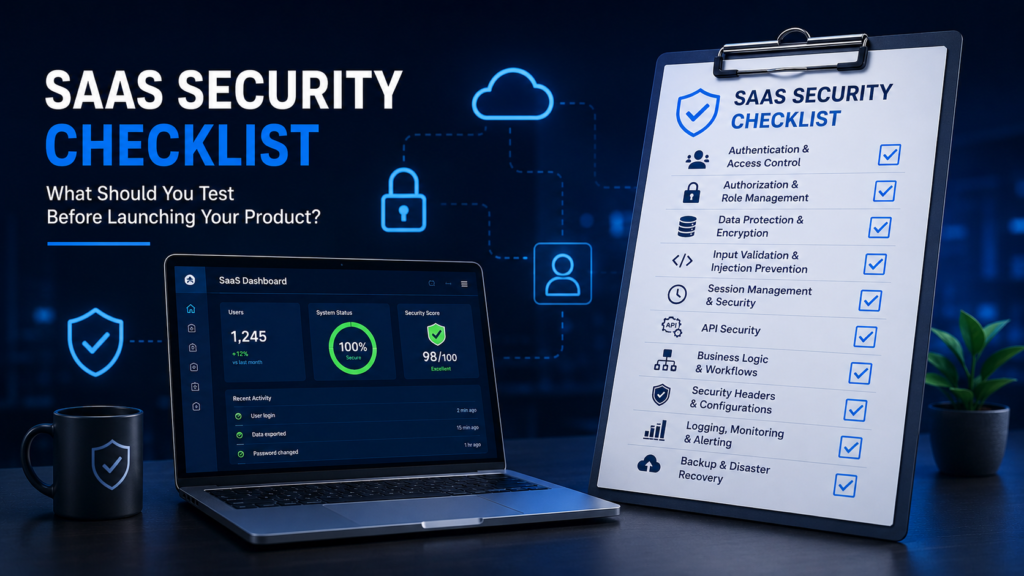
A complete pre-launch SaaS security checklist covers 12 domains: architecture and threat modeling, authentication and session security, authorization and tenant isolation, business logic workflows, API security, common web vulnerabilities, cloud infrastructure, source code and dependencies, data protection, third-party integrations and CI/CD, logging and monitoring, and an independent security assessment with retesting of critical findings.
Each domain is covered in detail below.
1. Review the Architecture and Threat Model
Document sensitive assets, entry points, and trust boundaries across the application. Map user roles, administrative access paths, and how the multi-tenant architecture separates one customer’s data from another. Trace data flows through high-risk workflows such as billing, data export, and account provisioning. This step is largely manual because it depends on understanding intended behavior rather than scanning for known signatures.
2. Test Authentication and Session Security
Verify login controls, password reset flows, and email verification cannot be bypassed. Confirm multi-factor authentication is enforced where required, and that account enumeration and brute-force attempts are throttled. Review session expiration, secure cookie flags, JSON Web Token validation, refresh token handling, and whether logout actually invalidates active sessions. Automated tools catch missing security headers, but token logic and session fixation usually need manual verification.
3. Test Authorization and Tenant Isolation
This is one of the most important checks for any SaaS product. Test role-based permissions, object-level authorization, and function-level authorization across every user tier. Check for horizontal privilege escalation between accounts at the same level and vertical escalation into administrative functions. Pay close attention to cross-tenant data access, team invitations, account ownership transfers, and data exports.
A common example: a customer changes an object identifier in an API request, such as an invoice ID, and receives another customer’s data because the backend never confirmed the record belonged to the requesting tenant. Automated scanners rarely catch this because the request looks syntactically valid. This is exactly the kind of issue that structured web application penetration testing is designed to surface before real customers encounter it.
4. Test Business Logic Workflows
SaaS products have abuse cases that only make sense in context: bypassing subscription tier restrictions, accessing premium features without payment, manipulating free trial periods, abusing referral credits or coupons, altering billing values client-side, replaying one-time actions, skipping approval steps, or exploiting race conditions during checkout. Automated scanners look for known vulnerability patterns, not deviations from business rules, so these findings almost always require a tester who understands the product’s workflows.
5. Assess API Security
Most SaaS products are API-driven, so API testing deserves dedicated attention. Review API authentication, object-level and function-level authorization, and whether responses expose more fields than the client needs. Check for mass assignment on update endpoints, missing rate limiting, weak API key handling, overly broad token scopes, forgotten deprecated endpoints, and verbose error messages. If the product uses GraphQL, review query depth limits and introspection exposure. Webhook endpoints should verify signatures before trusting incoming payloads.
6. Check for Common Web Application Vulnerabilities
Beyond authorization issues, test for SQL or NoSQL injection, cross-site scripting, server-side request forgery, cross-site request forgery, path traversal, unrestricted file upload, open redirects, and misconfigurations that leak stack traces or debug information. Automated scanners flag many of these patterns efficiently, but manual testing confirms exploitability and finds logic-dependent variants, such as injection points reachable only after a specific multi-step workflow.
7. Review Cloud Infrastructure and Production Configuration
Review cloud IAM permissions for overly broad access, publicly accessible storage buckets, exposed databases, and misconfigured security groups. Check administrative interfaces, cloud metadata service access, and container or serverless function permissions. Confirm encryption is enabled in transit and at rest, backups exist, and staging environments are not reachable with production data or default credentials. Debug mode should be disabled in production, and TLS configuration and security headers should be verified. Dedicated cloud penetration testing covers this ground more thoroughly than a generic application scan.
8. Review Source Code, Dependencies, and Secrets
Source review should look for hardcoded credentials, missing authorization checks, weak cryptographic implementations, injection risks, sensitive data written to logs, unsafe deserialization, and leftover debug functionality. Check dependencies for known vulnerabilities and unmaintained packages. CI/CD secrets, API keys, and database credentials should never live in source control, and rotation procedures should exist for when a secret is exposed. A structured cybersecurity code review catches issues that black-box testing alone cannot reach.
9. Validate Data Protection and File Security
Classify what data the product handles and confirm encryption in transit and at rest. Review data minimization and retention practices, secure deletion, and whether data exports and backups are themselves encrypted. Check that sensitive information is not written to application logs. For file uploads, validate file types server-side, sanitize filenames, restrict storage permissions, use signed URLs, and confirm files are not publicly accessible by guessing a URL.
10. Assess Third-Party Integrations and CI/CD Security
Review OAuth permission scopes granted to third-party integrations, webhook configurations, and external scripts loaded into the application. Confirm vendor access is scoped to what is necessary. On the CI/CD side, check build and deployment permissions, branch protection rules, who can push to production, and whether staging and production are genuinely separated rather than sharing credentials.
11. Test Logging, Monitoring, Backups, and Incident Response
Confirm the system logs failed logins, administrative actions, permission changes, data exports, billing changes, and unusual API activity, and that logs are protected from tampering. Security alerting should notify the right people when suspicious patterns occur. Backups are only useful if they can be restored, so test the restoration process rather than assuming a completed backup job is sufficient. Document who owns incident response and how the team communicates during an incident.
12. Conduct an Independent Security Assessment and Retest Fixes
Internal teams often test around their own assumptions, which is why an outside perspective matters before launch. Vulnerability assessment services identify and prioritize known weaknesses across the environment, while manual penetration testing confirms real-world exploitability. Understanding the difference between vulnerability assessment and penetration testing helps teams choose the right level of assurance for their launch timeline. Critical and high-risk findings should be remediated before launch, fixes should be retested, and accepted risks should be documented with a clear owner.
How Does Automated Scanning Compare to Manual Penetration Testing for SaaS?
Automated scanning and manual penetration testing address different vulnerability categories and serve different purposes in a pre-launch security program. Neither replaces the other. Automated tools provide speed and repeatable coverage for pattern-based issues. Manual testers are better positioned to find broken authorization, cross-tenant access, business logic abuse, chained vulnerabilities, and workflow manipulation that requires understanding application context.
| Testing Method | Best For | Main Limitation |
| Automated vulnerability scanning | Broad coverage of known vulnerability patterns and misconfigurations | Misses authorization logic, business rules, and context-dependent flaws |
| Vulnerability assessment | Identifying and prioritizing known weaknesses across the environment | Does not confirm real-world exploitability |
| Secure code review | Catching flaws in logic, cryptography, and configuration at the source | Cannot fully replicate runtime behavior or deployment context |
| Manual penetration testing | Authorization abuse, cross-tenant access, business logic flaws, chained exploits | Time-boxed to the scope and duration of the engagement |
None of these methods alone provides complete assurance. A pre-launch program that combines automated scanning, code review, and manual penetration testing covers both the known-pattern finding categories and the context-dependent ones that represent the most significant risk for a multi-tenant SaaS product.
For a detailed comparison of where automated tools perform well, what manual testers uncover, and when each approach should be used, our manual vs. automated penetration testing guide explains the differences in depth.
It also shows why combining automated scanning with manual penetration testing provides broader coverage for SaaS applications before launch.
Which Vulnerabilities Should Block Your SaaS Launch?
Certain findings must be remediated and retested before any production launch. Authentication bypass, cross-tenant data exposure, remote code execution, critical injection vulnerabilities, broken administrative authorization, exposed production credentials, payment or subscription manipulation, unrestricted data exports, and critical cloud misconfigurations are non-negotiable blockers regardless of timeline pressure.
Severity should be judged alongside exploitability, affected assets, data sensitivity, and business impact rather than on a generic label from a scanner. A CVSS score measures theoretical severity in a generic context. What matters for a launch decision is whether the finding is exploitable in your specific production environment and what the realistic consequence of exploitation is.
Does SaaS Security Testing End After Launch?
No. The attack surface keeps changing after launch. New features, integrations, dependency updates, infrastructure changes, and new API endpoints all introduce fresh risk. A pre-launch test reflects the product as it existed on that date. Teams that ship frequently benefit from continuous penetration testing rather than a single pre-launch assessment, since a one-time test only captures a moment in a continuously changing environment.
New features that modify authentication flows, new API endpoints that handle tenant data, and new third-party integrations that receive access to customer records each represent a fresh security boundary that the previous test did not evaluate. Building testing into the release process rather than treating it as a pre-launch event addresses this reality directly.
At Bugstrix, we work with SaaS teams at different stages of this cycle: pre-launch assessment to validate the initial architecture and catch critical issues before go-live, and ongoing security programs that integrate testing into the development cadence after launch.
Pre-Launch Security Checklist
Use this checklist to confirm all 12 domains have been addressed before launch:
- Threat model completed and trust boundaries documented
- Authentication tested including reset flows, MFA enforcement, and session handling
- Authorization tested across all user roles and permission levels
- Tenant isolation verified through cross-tenant access testing
- Sessions and tokens tested for fixation, expiration, and revocation
- Business logic tested for subscription abuse, billing manipulation, and workflow bypass
- APIs assessed for authorization, rate limiting, and excessive data exposure
- Cloud environment reviewed for IAM, storage, and network configuration
- Source code reviewed for hardcoded credentials and authorization gaps
- Dependencies scanned for known vulnerabilities
- Secrets protected and rotation procedures documented
- Data protection validated including encryption and log hygiene
- Logging and alerting enabled for security-relevant events
- Backups tested through actual restoration
- Critical findings remediated and retested before launch sign-off
Frequently Asked Questions
What should a SaaS company test before launch?
A SaaS company should test authentication, authorization and tenant isolation, business logic, APIs, cloud infrastructure, source code and dependencies, data protection, and logging and backup recovery. Automated scanning and manual penetration testing should both be part of this process, since each catches different issues that the other structurally cannot surface.
Is automated vulnerability scanning enough for SaaS security?
No. Automated scanning is effective for known vulnerability patterns and misconfigurations, but it consistently misses authorization flaws, cross-tenant data access, and business logic abuse. These issues depend on understanding how the application is meant to behave, which requires manual testing by a tester who was briefed on the product’s intended behavior and permission model.
Does a SaaS startup need penetration testing before launch?
Most SaaS startups benefit from at least one manual penetration test before launch, particularly if the product handles customer data across multiple tenants. It catches authorization and tenant isolation issues that automated tools miss, and it is frequently requested by enterprise buyers during vendor security reviews as a condition of signing.
How often should a SaaS product undergo security testing?
Testing should not stop at launch. New features, integrations, dependency updates, and infrastructure changes all introduce fresh risk. Many SaaS teams schedule testing at regular intervals or move toward continuous testing aligned with their release cycle. The right cadence depends on how frequently the environment changes and what compliance obligations apply.
Conclusion
A secure SaaS launch takes more than running an automated scanner and clearing the report. Tenant isolation, access control, business logic testing, API security, and cloud configuration all need dedicated attention, and the findings from that process need to be remediated and retested. Independent penetration testing adds a perspective internal teams often cannot provide on their own, since it is not shaped by the assumptions the development team made while building the product.
If your team is preparing for launch, contact Bugstrix to discuss a pre-launch security assessment.