What Is Mobile Application Penetration Testing?

Written By
Sarwat Iftikhar
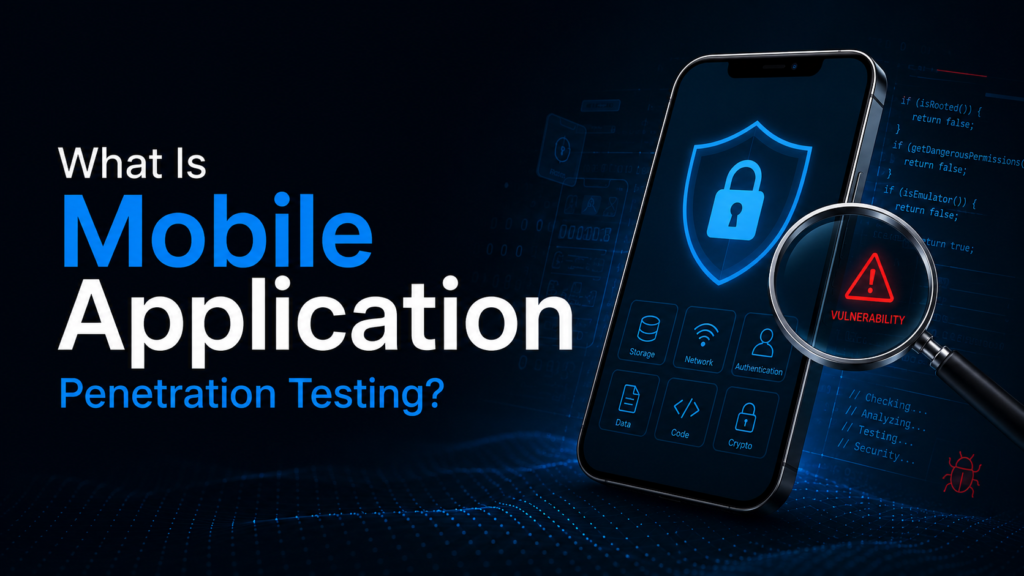
Mobile application penetration testing is a structured security assessment that simulates real-world attacks against iOS and Android applications to identify exploitable vulnerabilities before malicious actors do. Unlike automated scanning, it involves manual exploitation techniques, reverse engineering, runtime analysis, and API security testing that reflect how actual attackers approach a mobile target.
The stakes have shifted significantly. In the first quarter of 2026 alone, security firms detected over one million mobile phishing attacks targeting enterprise users and identified more than 193,000 malicious or vulnerable applications on enterprise devices. Mobile penetration testing is growing at a 19.23% compound annual growth rate, the fastest of any security testing category, because the threat landscape driving it has outpaced what most organizations thought they needed to test.
This guide covers what mobile application penetration testing actually is, how it works, what it finds, and how it differs from the automated scanning most teams already run.
Key Takeaways
- Mobile application penetration testing is a manual, adversarial assessment of iOS and Android apps covering the app binary, runtime behavior, local storage, API communication, and backend authentication.
- 60% of iOS applications and 43% of Android applications have vulnerabilities related to insecure data storage that could expose sensitive personal data.
- Mobile pen testing is not the same as automated scanning. The vulnerabilities that matter most in mobile apps, including broken authentication, insecure API authorization, and runtime manipulation, require human testing to find.
- Android malware attacks surged 29% in the first half of 2025, with 34 active banking malware families targeting over 1,200 financial institutions across 90 countries.
- The OWASP Mobile Application Security Verification Standard (MASVS) is the industry baseline for what a mobile penetration test should cover and what counts as a vulnerability.
Why Does Mobile App Security Matter More in 2026?
Mobile app security matters more in 2026 because mobile has become the primary surface through which businesses handle sensitive customer interactions, financial transactions, and healthcare data. That surface is now under more active, sophisticated attack than at any previous point. The volume, speed, and targeting precision of mobile attacks have all increased significantly, while most organizations are still applying security testing practices designed for 2020.
The attack surface is fundamentally different from traditional web applications, which is why generic security testing misses mobile-specific vulnerabilities. A mobile app runs on hardware controlled by the user, not the developer. The app binary can be extracted, decompiled, and analyzed. SSL pinning can be bypassed. Authentication tokens stored insecurely on the device can be extracted without triggering any server-side alert. Runtime behavior can be manipulated using freely available tools that any attacker with basic technical skills can operate.
The consequences are real and growing. 63% of organizations suffered significant repercussions from downtime following mobile security incidents in 2025, up from 47% the year before. HIPAA violations related to mobile app security failures can exceed $1.5 million per violation category. PCI DSS v4.0 explicitly includes mobile payment application environments in its scope. For any business with a mobile app that touches financial data, health information, or personal user data, the question is no longer whether to test but whether testing is happening at the right depth and frequency.
What Exactly Does a Mobile Application Penetration Test Cover?
A mobile application penetration test covers five distinct layers of the mobile attack surface: the application binary and code, local data storage on the device, network communication and API security, authentication and session management, and the backend services the app connects to. Testing any one of these layers in isolation misses the vulnerabilities that live at the boundaries between them.
Binary and static analysis involves decompiling the application to examine its code structure without executing it. Testers look for hardcoded API keys, credentials, and secrets embedded in the binary. They examine how the application handles sensitive data in memory, whether obfuscation can be reversed to expose business logic, and whether the build configuration exposes debugging capabilities in production builds. iOS and Android each have distinct binary formats and analysis approaches that require platform-specific expertise.
Local data storage testing examines every location on the device where the app writes or reads data. This includes SQLite databases, shared preferences files, the iOS Keychain and Android Keystore, application logs, temporary cache directories, clipboard access, and screenshot behavior. Insecure data storage is the most consistently present vulnerability class across both platforms, with 60% of iOS apps and 43% of Android apps showing exploitable weaknesses in this category.
Network and API communication testing captures and analyzes all traffic between the app and its backend services. This includes bypassing SSL certificate pinning, testing API endpoints for authorization failures, examining how authentication tokens are transmitted and stored, and validating that sensitive data is not transmitted in plaintext or in easily reversible encoding.
Authentication and session management testing evaluates the login flow, multi-factor authentication implementation, token lifecycle, session invalidation, and biometric authentication logic. This layer frequently reveals bypass opportunities where the frontend enforces authentication checks that the backend API does not independently validate.
Backend and server-side testing treats the mobile app as a client and tests the underlying API services for the same vulnerability classes relevant to web application testing: IDOR, broken access control, server-side injection, and business logic flaws. The mobile client is often where backend authorization failures are first discovered because mobile apps make API calls that are more easily intercepted and manipulated than browser-based web application traffic.
How Is Mobile Penetration Testing Different From Web Application Testing?
Mobile penetration testing differs from web application testing in three fundamental ways: the testing environment, the attack surface, and the methodology required to access it. A mobile app tester needs a different toolkit, different platform knowledge, and a different analytical approach than a web application tester, even when both are ultimately testing the same backend API.
The most significant difference is physical. A web application runs on a server that the tester accesses remotely. A mobile application runs on a device that an attacker can physically hold, root or jailbreak, instrument at the process level, and analyze in ways that are not possible with server-side applications. This changes what “testing the application” means, specifically that it includes testing the application as it runs on a compromised device, because that scenario reflects how a significant portion of real-world attacks work.
The development environment differences compound this. iOS and Android have distinct security models, permission systems, data storage mechanisms, and inter-process communication frameworks. Testing an iOS application requires familiarity with the iOS security architecture, Objective-C and Swift reverse engineering, Frida instrumentation on jailbroken devices, and the iOS Keychain and app sandbox boundaries. Testing an Android application requires a different but equally specific set of skills: APK decompilation, ART runtime analysis, Android manifest inspection, intent and broadcast receiver testing, and rooted device instrumentation.
The API layer is where mobile and web application testing most directly overlap. Both involve testing REST or GraphQL APIs for authorization failures, injection vulnerabilities, and business logic flaws. What differs is how that API traffic is captured. Proxying browser traffic is straightforward. Proxying mobile app traffic requires bypassing certificate pinning implementations specific to each platform and each app’s implementation.
For a detailed look at how web application security testing methodology applies to the API layer that both web and mobile apps share, our web app penetration testing services page covers the web-side approach in depth.
What Are the Most Common Vulnerabilities Found in Mobile Apps?
The most common vulnerabilities found in mobile apps cluster around insecure data storage, improper credential handling, broken authentication, and insufficient transport layer security. These categories appear consistently across iOS and Android regardless of industry, platform version, or development team experience, because they reflect structural patterns in how mobile apps are built rather than one-off coding mistakes.
Improper credential usage is the leading vulnerability class in the OWASP Mobile Top 10 (2024 edition). This covers hardcoded credentials in the binary, API keys embedded in the app code that cannot be revoked without pushing a new release, and authentication tokens stored in insecure locations that persist beyond their intended validity period.
Inadequate supply chain security ranks second in the OWASP Mobile Top 10 because mobile apps rely heavily on third-party SDKs for analytics, advertising, payments, and crash reporting. Each SDK is a dependency with its own permission requirements, data access, and potential vulnerability surface. A well-tested first-party app can still be compromised through an SDK it depends on.
Insecure authentication and session management covers a broad class of failures: login flows that do not independently validate credentials on the server side, biometric authentication implementations that an attacker with root access can bypass, session tokens that do not expire correctly, and MFA implementations that validate the code on the client rather than confirming it server-side.
Insecure data storage affects 60% of iOS apps and 43% of Android apps. The most common manifestations are sensitive data written to unprotected SQLite databases, credentials stored in plaintext in shared preferences files, and personally identifiable information appearing in application logs that persist on the device after a session ends.
Insufficient transport layer protection ranges from missing SSL certificate pinning that allows a man-in-the-middle attack to intercept API traffic, to outdated TLS configurations that support deprecated cipher suites, to API responses that include more data than the requesting user is authorized to see.
The OWASP Mobile Application Security Testing Guide (MASTG) is the most comprehensive public reference for what a mobile penetration test should cover across each of these categories. The OWASP MASVS, the corresponding verification standard, defines the specific security requirements that a mobile app should meet and provides the baseline against which a penetration test evaluates the application.
What Is the Methodology for iOS vs Android Penetration Testing?
iOS and Android penetration testing share the same high-level phases but require different tools, techniques, and platform knowledge at every stage. A tester who is proficient on one platform cannot simply transfer that expertise to the other without dedicated platform-specific training.
iOS penetration testing requires a jailbroken device or a simulator with sufficient instrumentation capability. The testing workflow covers:
Static analysis begins with extracting the IPA file, decrypting it if necessary, and examining the binary using platform-specific tools to identify hardcoded secrets, URL schemes, third-party library usage, and dangerous function calls. The Info.plist file reveals permissions, URL scheme registrations, and configuration details that inform the dynamic testing phase.
Dynamic analysis runs the application on a jailbroken device instrumented with a framework like Frida, which allows the tester to hook into running processes, bypass SSL pinning implementations, intercept and modify function calls in real time, and examine the application’s behavior at the runtime level without modifying the binary itself.
Storage testing examines the iOS Keychain, application group containers, UserDefaults, Core Data databases, and temporary directories for sensitive data that persists beyond session boundaries or that is stored with insufficient access controls.
Android penetration testing follows a parallel structure with platform-specific tools and techniques:
Static analysis begins with decompiling the APK using tools that convert Dalvik bytecode back to readable Java-equivalent code. The Android manifest reveals declared permissions, exported activities, content providers, broadcast receivers, and intent filters that define the app’s external attack surface. Hardcoded strings, API keys, and credentials are identified through pattern analysis of the decompiled source.
Dynamic analysis uses a rooted device or an emulator instrumented with Frida or similar frameworks. Android’s more open permission model gives testers greater flexibility to intercept inter-process communication, examine broadcast intents, and test how the app responds to manipulated input from other applications on the same device.
Content provider and intent testing examines exported Android components for injection vulnerabilities, unauthorized data access through content URIs, and intent hijacking scenarios where a malicious app on the same device can intercept data meant for the legitimate application.
How Is a Mobile App Penetration Test Structured From Start to Finish?
A mobile app penetration test is structured across four phases: scoping and environment setup, static analysis, dynamic and runtime testing, and reporting with remediation guidance. The full engagement typically runs one to three weeks depending on the complexity of the application and whether backend API testing is included in scope.
Phase 1: Scoping and environment setup. Before any testing begins, the scope is defined to cover which versions of the app are in scope (production, staging, or both), which platforms require testing (iOS only, Android only, or both), whether the test includes backend API testing or is limited to the client-side app, and what test accounts and test data are available. The testing environment is prepared: test devices are rooted or jailbroken, proxy certificates are installed, and baseline traffic from the app is captured to understand its normal behavior before adversarial testing begins.
Phase 2: Static analysis. The application binary is extracted and analyzed without execution. This phase covers the full decompilation and code review process for platform-specific artifacts, hardcoded credential identification, permission analysis, third-party SDK inventory, and network endpoint enumeration from the code. Static analysis is not constrained by runtime context and can surface vulnerabilities that would never appear during normal application use.
Phase 3: Dynamic and runtime testing. The application is run on an instrumented device and tested under real conditions. This phase covers SSL pinning bypass and traffic interception, runtime function hooking, authentication flow testing, local storage examination during and after an active session, API endpoint testing with manipulated parameters, and business logic testing against the scenarios specific to the application’s function. This is the most time-intensive phase and the one that produces the highest-impact findings.
Phase 4: Reporting and remediation guidance. Every confirmed vulnerability is documented with the reproduction steps, evidence of exploitability (screenshots, intercepted traffic, or code excerpts), severity classification using CVSS scoring, the OWASP Mobile Top 10 category it falls under, and specific remediation guidance at the code or configuration level. The report is structured for two audiences: developers who need implementation-level guidance to fix findings, and security and compliance stakeholders who need the risk context to prioritize remediation effort.
Our mobile app penetration testing services follow this four-phase methodology across both iOS and Android, with platform-specific tooling and testers who specialize in each environment.
If you are ready to scope a mobile app assessment for your iOS or Android application, get a free quote, and we will map the engagement to your specific platform, compliance requirements, and development timeline.
How Much Does Mobile App Penetration Testing Cost?
Mobile application penetration testing costs between $5,000 and $25,000 for most single-platform engagements in 2026, with dual-platform iOS and Android assessments running $10,000 to $35,000 depending on application complexity, scope depth, and whether backend API testing is included.
The primary cost drivers in mobile testing:
Platform coverage is the first scope decision. Testing both iOS and Android is not simply twice the work of testing one platform. The two platforms require different testing approaches, different tooling, and different expertise. Dual-platform assessments cost more than single-platform but provide complete coverage of the actual attack surface for apps available on both stores.
Backend API inclusion significantly affects cost. A mobile app penetration test that covers only the client-side app is faster but misses the server-side authorization and business logic vulnerabilities that are frequently the most impactful findings. Full-scope engagements that include backend API testing are recommended for any application that handles sensitive or financial data.
Application complexity reflects the number of screens, user roles, authentication flows, and third-party SDK integrations in scope. A simple consumer-facing app with one user role and basic authentication is a different scope from an enterprise mobile platform with SSO, biometric authentication, push notification handling, offline data sync, and multiple role-based access levels.
For a complete breakdown of how mobile penetration testing costs compare to other assessment types and what specific factors drive price variation, our post on penetration testing costs in 2026 covers the full pricing landscape.
When Should a Mobile App Be Penetration Tested?
A mobile application should be penetration tested before its initial public release, after any significant feature update that modifies authentication, data storage, or API communication, and at minimum annually as part of an ongoing security program. Testing before release is the highest-leverage point: findings discovered before launch can be fixed without customer exposure, without app store review complications, and without the reputational cost of a post-launch security disclosure.
The specific triggers that should prompt an immediate mobile security assessment:
Pre-launch testing should be standard for any app that handles user accounts, financial transactions, or personal data. The cost of finding and fixing a critical authentication bypass before launch is a fraction of the cost of responding to a breach and managing an emergency update cycle under public scrutiny.
Post-major-release testing applies to any release that introduces new authentication mechanisms, changes how data is stored locally, adds new API integrations, implements in-app payments, or modifies how the app handles sensitive data at rest or in transit. These changes are the most common source of new vulnerabilities introduced between annual tests.
Compliance-triggered testing applies when PCI DSS scope includes a mobile payment application, when a HIPAA-covered entity deploys a patient-facing mobile app, or when SOC 2 audit preparation identifies mobile applications within the defined system boundary. Each of these frameworks creates an obligation that mobile apps handling relevant data are tested.
Post-incident testing should always include a mobile security assessment if the incident involved a mobile application, user credentials obtained through a mobile vector, or API endpoints accessed from mobile clients. An incident surfaces one vulnerability; testing surfaces the others that the incident response process did not examine.
The broader penetration testing services framework at Bugstrix treats mobile testing as a coordinated component of the overall security assessment program rather than a standalone activity, which is how it produces the most comprehensive coverage of the complete attack surface.
Frequently Asked Questions
What is the difference between mobile app penetration testing and a mobile security audit?
A mobile app penetration test is an active, adversarial assessment where a tester attempts to exploit identified vulnerabilities to confirm real-world impact. A mobile security audit is a structured review of the application and its security controls against a standard such as OWASP MASVS, assessing whether required controls are in place without necessarily attempting to exploit gaps. Most mature security programs use both: an audit to confirm controls exist, and a penetration test to confirm they hold up under attack.
Does a mobile app penetration test cover both iOS and Android?
It depends on the scope of the engagement. Each platform requires a separate testing environment, different tooling, and different platform-specific expertise. A single quote for mobile pen testing should specify whether iOS, Android, or both are included. For apps available on both stores, testing both platforms is recommended because the same backend vulnerability may have a different exploitability profile depending on whether it is accessed from an iOS or Android client.
Can automated tools replace manual mobile penetration testing?
No. Automated mobile security scanners identify known issues against a list of patterns: hardcoded strings matching common credential formats, missing security flags on storage objects, and similar detectable signatures. They cannot bypass SSL pinning dynamically, perform runtime hooking to intercept function calls, test business logic specific to the application, or identify authorization failures that require understanding what each user role should and should not be able to access. The OWASP Mobile Top 10 categories that cause the most significant real-world breaches are almost entirely outside what automated tools can reliably identify.
What is OWASP MASVS and why does it matter for mobile penetration testing?
The OWASP Mobile Application Security Verification Standard (MASVS) is the industry-standard framework defining security requirements for mobile applications. It specifies what controls a mobile app should have, organized into levels based on the sensitivity of the application. A mobile penetration test aligned to MASVS uses the standard as the test plan, confirming whether each control exists and whether it holds under adversarial testing. MASVS alignment makes penetration test findings directly actionable for development teams and provides a clear compliance reference for organizations operating under PCI DSS, HIPAA, or SOC 2.
What should be included in a mobile penetration test report?
A comprehensive mobile penetration test report should include: an executive summary mapping findings to business risk, platform-specific findings documented with reproduction steps and exploitation evidence, severity ratings using CVSS scoring with OWASP Mobile Top 10 category mapping, specific remediation guidance at the code or configuration level for each finding, and a retest commitment confirming that remediated findings are verified as closed. Reports should be structured for both development teams who need implementation guidance and security stakeholders who need risk prioritization context.
Final Takeaways on Mobile App Security Testing
Mobile applications are now primary targets for financially motivated attackers, nation-state actors, and opportunistic criminals using freely available exploit toolkits. The combination of a device that users control, an app binary that can be extracted and analyzed, and a backend API that is often more accessible from a mobile client than from a browser creates a threat profile that most traditional security testing approaches were not designed to address.
Mobile penetration testing is the mechanism that reveals what automated scanners miss, what the development team’s internal testing assumptions do not cover, and what an attacker with modest skill and freely available tools can actually do to your application and your users’ data. Getting that picture before your app reaches production, and keeping it current as the app evolves, is what a functioning mobile security program produces.
Contact us to discuss your mobile application security assessment